

Time off, sick leave, vacation — an employee asks for all of it from their phone, and the manager answers in the same place. A request never gets lost in a chat thread: it has a status, a history and a discussion.
A break is requested somewhere else — on the shift card; it is covered in the article “Breaks and activity on a shift”.
Step-by-step guide
Where requests live
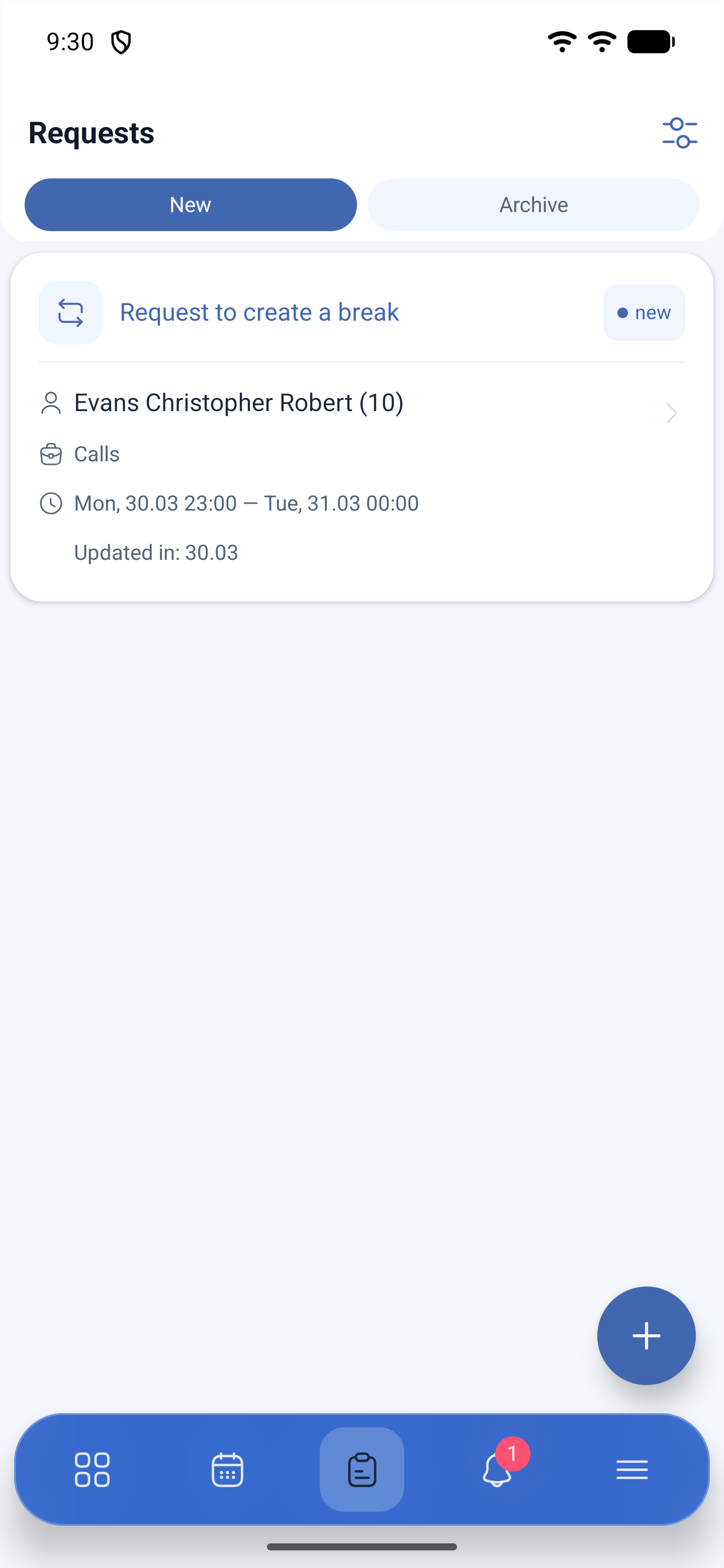
The third icon on the bottom bar is Requests. The screen is split into two tabs:
| Tab | What it shows |
|---|---|
| New | Requests that are still waiting for a decision |
| Archive | Processed ones — approved and declined |
The card shows the request type, the period and the date of the latest change. The create button is at the bottom right.
How to ask for time off
1. Open Requests and tap the create button at the bottom right.
2. Create request opens.
3. Fill in the Request type section.
4. Attach a document if you need to.
5. Tap Submit.
What you fill in:
| Field | What it sets |
|---|---|
| Type | Sick leave, vacation, holiday or another type set up in your company |
| Paid status | Whether the absence is marked as paid — depends on the type |
| Time off duration | The whole day or part of the day |
| Date | The day of the absence |
| Time | Appears if part of the day is selected |
| Attach file | A certificate, a scan, a photo of a document |
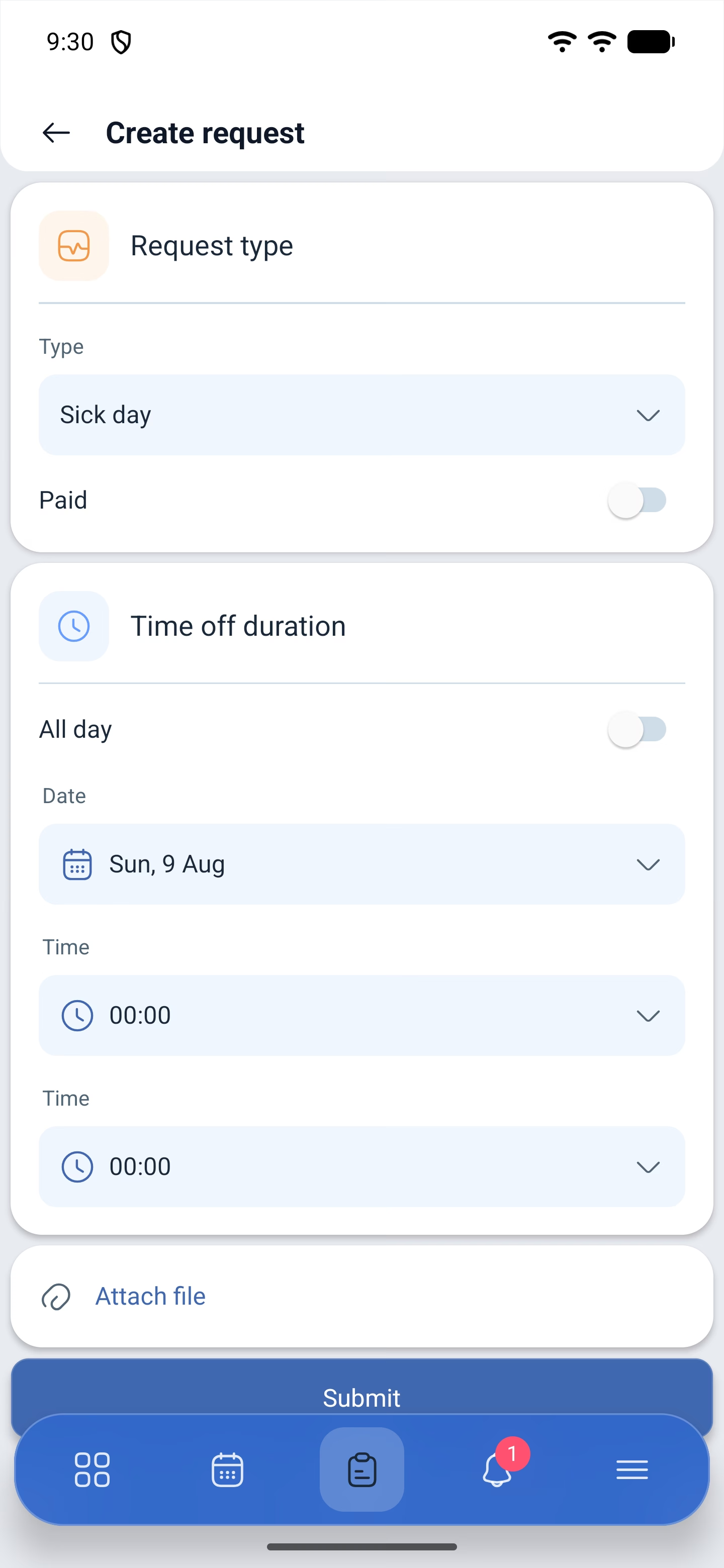
An employee’s form is shorter than a manager’s: it has no Options section, where you choose who the request is created for and whether shifts are moved to the open shifts list. An employee creates a request only for themselves — there is no employee selection field in the form.
What happens to shifts during time off
Time off by itself does not remove a shift. If you have shifts on those days, the manager decides what to do with them when approving: delete them or send them to the open shifts list. If you want to play it safe, give the shift away in advance — this is done on the shift card, through the three-dot menu.
How to find out the decision
The answer arrives in two ways: in Events — the fourth icon on the bottom bar — and in Archive on the requests screen. The request changes its status, and you can look through its correspondence.
Inside a request there is a discussion tab: it shows the history — Request created with the date — and a field for a message. Through it you can reply to the manager, if they ask for details, without leaving the request.
How to cancel your own request
Open the request on the New tab and tap Cancel request. The app will ask you to give the Reason of decline and send it — after that the request goes to the archive.
Possible problems and solutions
| Problem | Cause | Solution |
|---|---|---|
| The request form does not have the absence type you need | The type is not set up in the company | Absence types are created by the manager in the settings |
| You cannot request time off for a colleague | This is by design | An employee creates a request only for themselves |
| The request has been sent, but nothing changes | It is waiting for the manager’s decision | Check the request status and the discussion inside it |
| Answers to requests do not arrive | Notifications are turned off | My profile → Notifications, the Communication group |
| The file does not attach | It is too large | Make the file smaller or photograph the document right in the app |
Frequently asked questions (FAQ)
Question: The time off has been approved — will the shift disappear by itself? Answer: No. The manager decides what to do with the shifts on those days: delete them or send them to the open shifts list.
Question: Can I ask for a few hours off instead of a whole day? Answer: Yes, in the Time off duration field select part of the day and set the time.
Question: Where do I attach a sick leave certificate? Answer: The request form has Attach file. You can pick a file or photograph the document.
Question: Can I cancel a request I have already sent? Answer: Yes, open it and tap Cancel request, giving a reason.
Question: Where can I see declined requests? Answer: On the Archive tab. The reason for the decline arrives together with the decision, and the details are visible in the discussion.
Question: The manager wrote to me in the request — where do I reply? Answer: Inside the request, on the discussion tab, in the field for a message.