

Shifton uses a modular architecture that lets you pay only for the features you actually need. This article explains how the module system works and how to manage your active modules.
What Is This?
The Module System is the backbone of Shifton’s flexibility. Instead of a one-size-fits-all plan, Shifton offers 15 individual modules that you can mix and match based on your company’s requirements. Each module adds a specific set of features to your workspace — from payroll and attendance tracking to vacation management and forecasting.
Every new account starts with a free trial of up to 60 days for all modules: 10 days after registration, plus extra days for completing setup tasks, so you can explore everything before committing.
Prerequisites
How to Access the Modules Page
How to Enable or Disable a Module
Note: Disabling a module does not delete any data associated with it. If you re-enable the module later, your previous settings and records will still be there.
Pricing Model
Shifton uses a two-part pricing model for modules:
| Component | Description |
|---|---|
| Fixed monthly fee | A flat fee charged per month for the module itself, regardless of team size. |
| Per-employee fee | An additional fee charged per month for each active employee in your company. |
Pricing Example
Here is a sample calculation for a company with 10 employees using several modules:
| Module | Monthly Fee | Per-Employee Fee | Total (10 employees) |
|---|---|---|---|
| Base platform | $0/month | $1/employee | $0 + $10 = $10 |
| Payroll | $0/month | $0.50/employee | $0 + $5 = $5 |
| Attendance | $0/month | $1/employee | $0 + $10 = $10 |
| Time-Off Requests | $0/month | $1/employee | $0 + $10 = $10 |
The base platform cost is $1/employee/month. There is no flat monthly company fee. Module fees are added on top.
Free Trial
All modules come with a free trial of up to 60 days (Work Location Control: 10 days). During the trial:
- All features of the module are fully available.
- No credit card is required to start the trial.
- At the end of the trial, the module will be deactivated unless you subscribe.
List of Available Modules
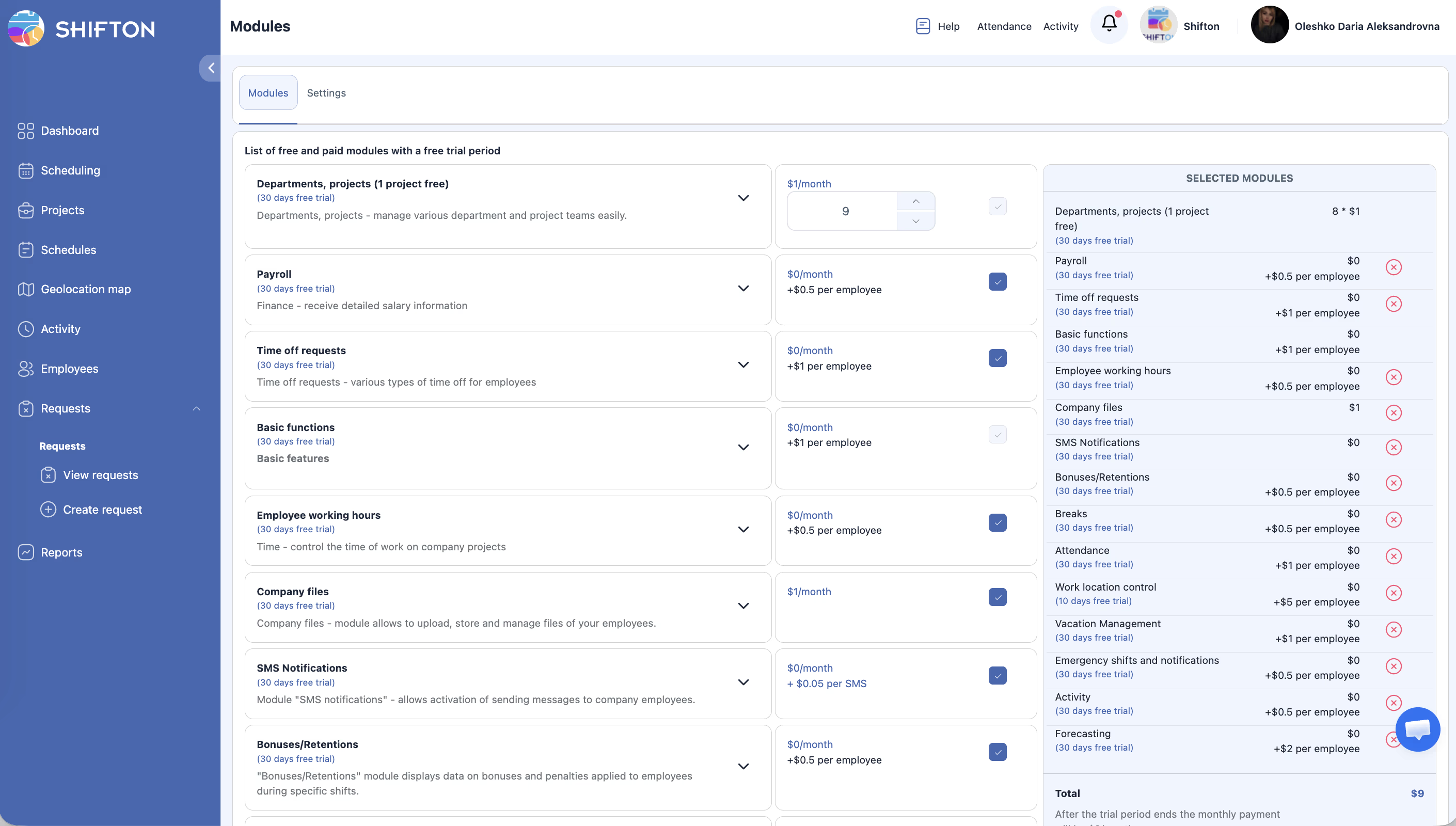
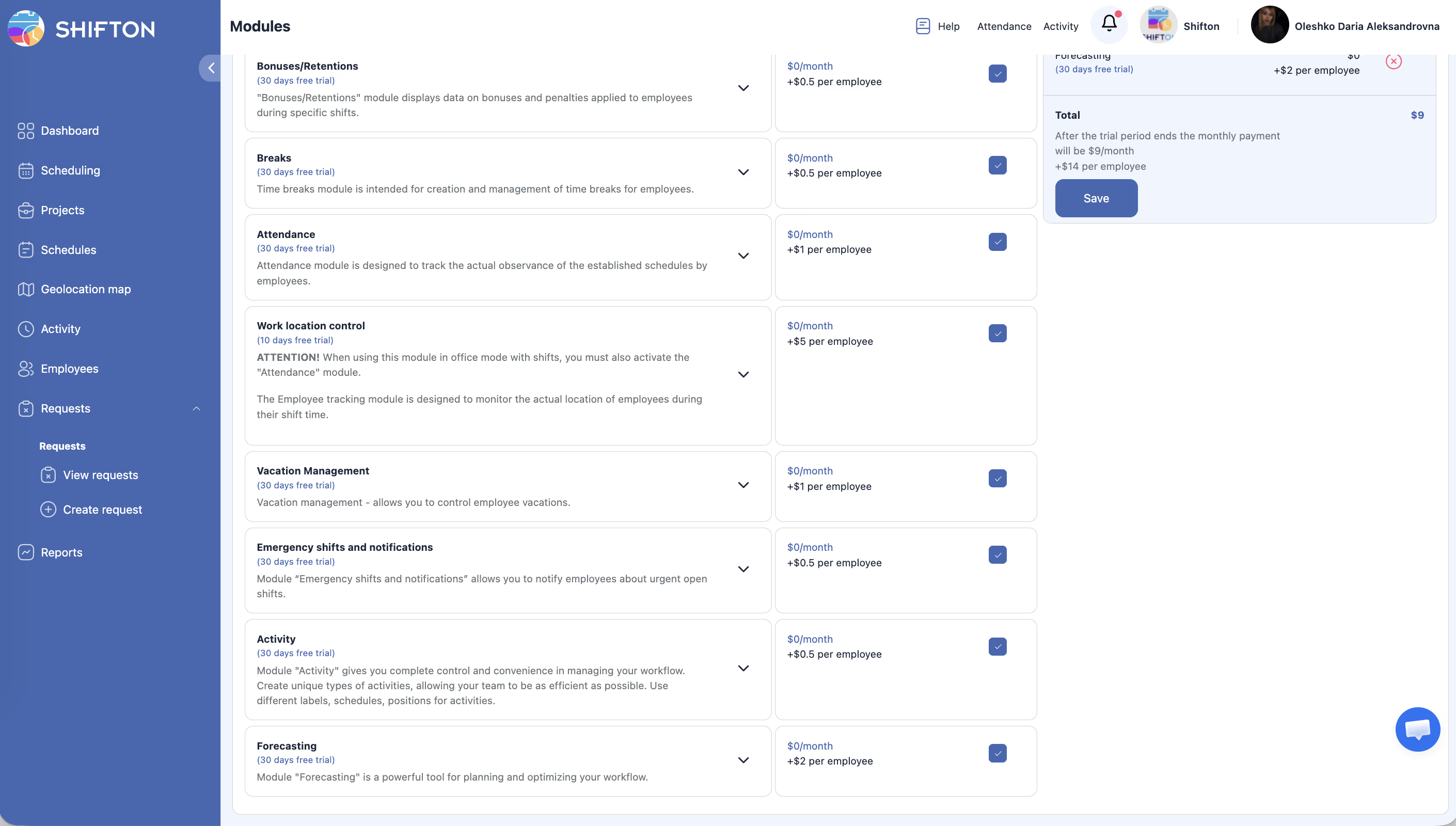
| # | Module | Fixed Fee | Per-Employee Fee |
|---|---|---|---|
| 1 | Departments and Projects | $1/month per project (1 free) | — |
| 2 | Payroll | $0/month | $0.50/employee |
| 3 | Time-Off Requests | $0/month | $1/employee |
| 4 | Employee Working Hours | $0/month | $0.50/employee |
| 5 | Company Files | $1/month | — |
| 6 | SMS Notifications | $0/month | $0.20–$0.70/SMS (depends on country, prepaid) |
| 7 | Bonuses/Deductions | $0/month | $0.50/employee |
| 8 | Breaks | $0/month | $0.50/employee |
| 9 | Attendance | $0/month | $1/employee |
| 10 | Work Location Control | $0/month | $5/employee |
| 11 | Vacation Management | $0/month | $1/employee |
| 12 | Emergency Shifts | $0/month | $0.50/employee |
| 13 | Activity | $0/month | $0.50/employee |
| 14 | Forecasting | $0/month | $2/employee |
Access Permissions
| Role | View Modules | Enable/Disable | Change Settings |
|---|---|---|---|
| Owner | Yes | Yes | Yes |
| Admin | Yes | Yes | Yes |
| Manager | Yes | No | No |
| Employee | No | No | No |
FAQ
Q: Can I try a module before paying for it?
A: Yes. Every module includes a free trial of up to 60 days (Work Location Control: 10 days) with full functionality. No payment information is required to start the trial.
Q: What happens to my data if I disable a module?
A: Your data is preserved. If you re-enable the module later, all your previous settings and records will be intact.
Q: Can I enable multiple modules at the same time?
A: Absolutely. You can enable any combination of modules that suits your workflow. Each module is billed independently.
Q: How is billing calculated if I enable a module mid-month?
A: Billing is prorated. You will only be charged for the remaining days of the current billing period.
Q: Is there a discount for enabling all modules?
A: Pricing is per-module. Contact Shifton support for information about volume or bundle discounts.
Possible Issues and Solutions
| Issue | Cause | Solution |
|---|---|---|
| Module toggle is grayed out | You do not have Admin or Owner permissions | Ask your account Owner or Admin to enable the module for you. |
| Module features not appearing after enabling | Browser cache showing old interface | Refresh the page or log out and log back in. |
| Trial ended but module still shows as active | Billing delay or grace period | Check your subscription status in the Billing section. |
| Settings tab is empty for a module | The module has no configurable settings, or it is not enabled | Verify the module is toggled on in the Modules tab. |
| Unexpected charges on invoice | Additional modules were enabled during the billing cycle | Review the Modules page to see which modules are currently active. |