

Shifton operates in two modes — choose the appropriate one during registration or switch later.
| Work Mode | Best For |
|---|---|
| Scheduling | Office teams, retail, call centers, healthcare — companies with fixed shifts |
| Field Service | Mobile teams — cleaning, maintenance, delivery, repair |
Scheduling Mode
Registration URL:app.shifton.com/registration
Key Features
Field Service Mode
Registration URL:app.shifton.com/registration?work_mode=field_service
Key Features
Mode Comparison
| Feature | Scheduling | Field Service |
|---|---|---|
| Shift planning | Yes | No |
| Task management | No | Yes |
| GPS tracking | Via module Location Control | Built-in |
| Invoicing | No | Yes |
| Client portal | No | Yes |
| Time-off requests | Yes | No |
| Reports | Yes (11 types) | Limited |
| Mobile app | Yes | Yes |
How to Register in the Desired Mode
Switching Work Modes
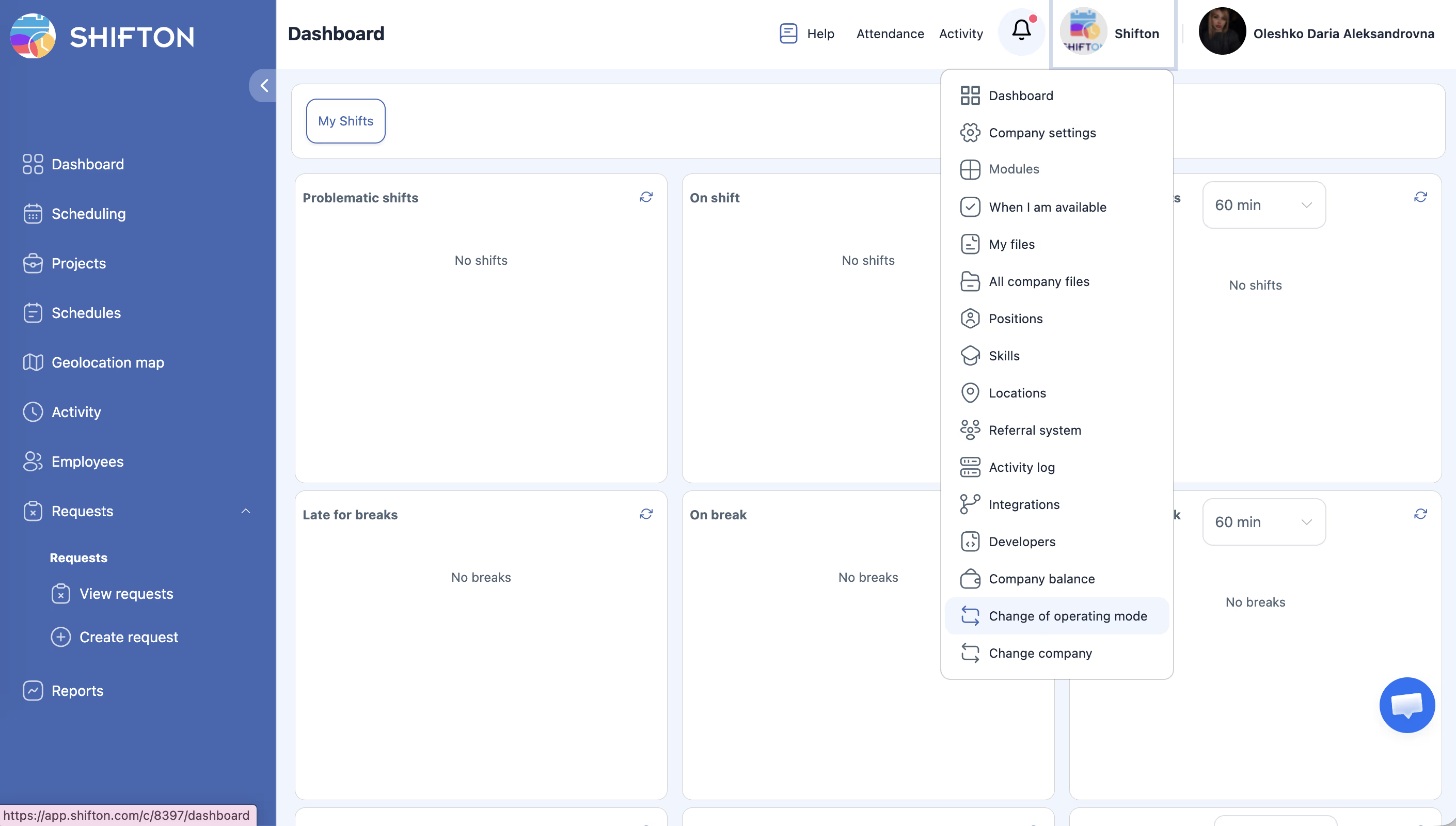
When switching modes, data is preserved.
Related Articles
- Company Registration
- Step-by-Step Setup Guide
- Company General Information
- Module System Overview
- Attendance
- Work Location Control
FAQ
Q: I registered for Scheduling, but I need Field Service — can I switch?
A: Yes. Company menu (company name, upper right corner) → Change of operating mode.
Q: Can I use both modes simultaneously?
A: No. The account operates in one mode.
Q: Which mode should I choose?
A: If employees work on a fixed schedule at one location — Scheduling. If they travel to different clients — Field Service.
Q: Is data preserved when switching modes?
A: Yes. Employee data, company settings, and billing are preserved when switching between modes.
Q: Is there a price difference between Scheduling and Field Service?
A: The base rate is the same. The difference is in the set of available modules and features for each mode.
Q: Can I switch between modes an unlimited number of times?
A: Yes. There are no restrictions on mode switching.
Q: Does Field Service work in the mobile app?
A: Yes. Field employees use the mobile app to receive tasks, checklists, and GPS tracking.
Q: Can I maintain a client database in Scheduling mode?
A: No. Client management is only available in Field Service mode.
Q: Are reports available in both modes?
A: Yes, but the report sets differ. In Scheduling — 11 report types for working hours and payroll. In Field Service — reports on tasks and invoices.
Q: Are Scheduling and Field Service different applications?
A: The web version is a single Shifton account that switches via the company menu. The mobile apps are different: Shifton Work Scheduling and Shifton Field Service — installed separately from the App Store and Google Play.
Q: Is client invoicing available in Scheduling?
A: No. Invoicing is a Field Service-only feature.
Q: Can one employee work in both modes?
A: No. One account operates in one mode at a time. For parallel use, register two separate accounts.
Q: Do I need to reinstall the mobile app when switching modes?
A: No. The app automatically adapts to the current company work mode.
Q: Can I import data from Scheduling to Field Service?
A: No. Employee and company data is preserved when switching, but schedules and tasks are different entities in each mode.
Q: In which mode is the Attendance module available?
A: The Attendance module is available in Scheduling mode. In Field Service, time tracking is done through task statuses and GPS tracking.
Q: Is there an API for both modes?
A: Yes. The Shifton API (api2.shifton.com) supports both work modes.
Q: Can I register two accounts — one for Scheduling, another for Field Service?
A: Yes. Register two accounts with different emails and use each in the desired mode.