

Shifton automatically calculates premium pay for night Shifts and work on holidays — you only need to configure the rules once in Salary Settings.
What Is a Night Shift in Shifton
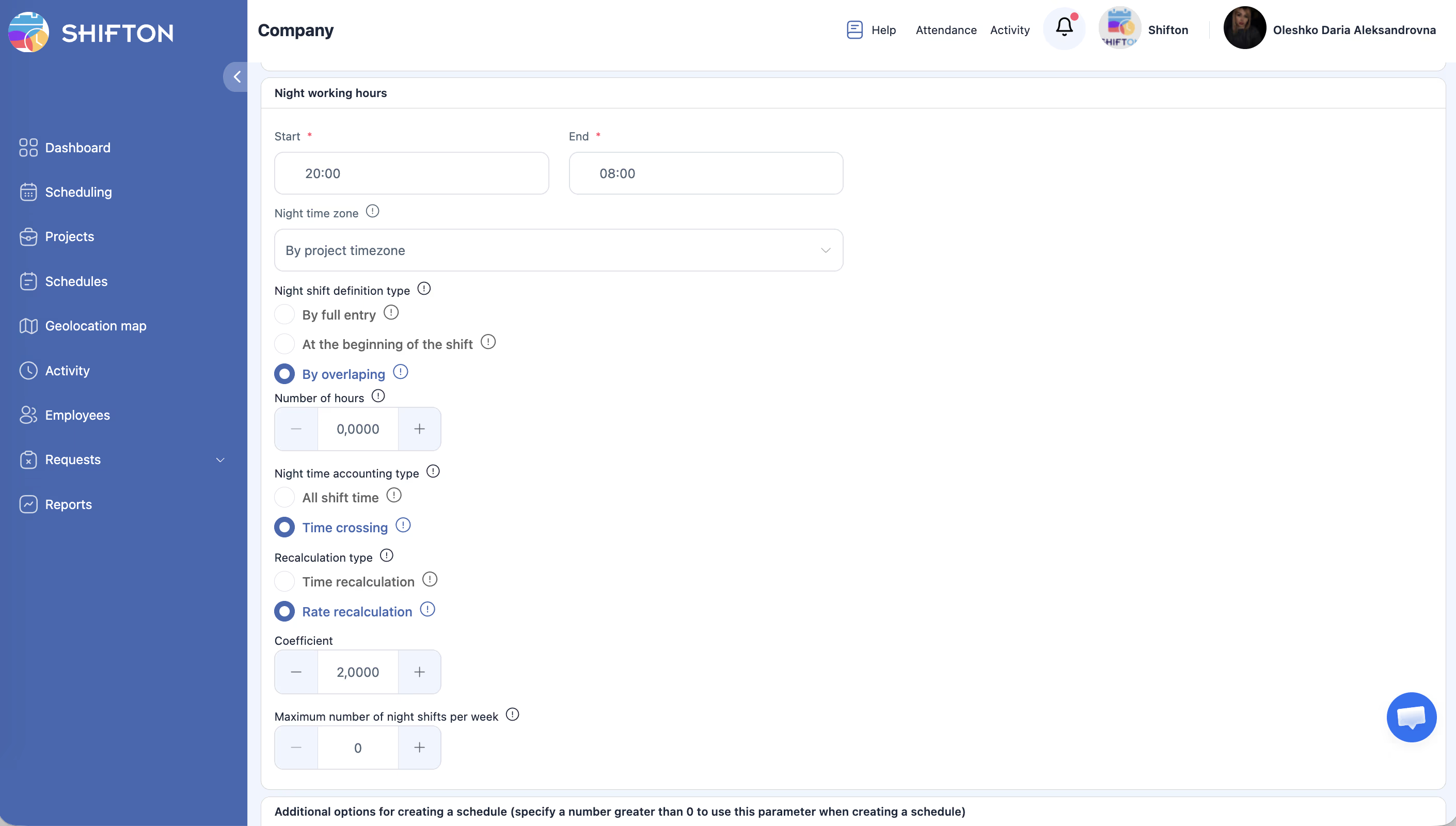
The night period is defined by the Admin: for example, from 20:00 to 08:00. Settings are located in Company Settings → Salary Settings → Night Working Hours.
Setting Up the Night Coefficient
Calculation Example
Settings: night period 20:00–08:00, accounting type — Time crossing, recalculation type — Rate recalculation, coefficient — 1.5, base rate — $30/hour.
Shift 18:00–06:00 (12 hours):
– 18:00–20:00 = 2 hours × $30 = $60 (regular rate)
– 20:00–06:00 = 10 hours × $30 × 1.5 = $450 (night rate)
– Total: $510
Holidays
How to Add a Holiday
How the Holiday Coefficient Works
The rate is set in Company Settings → Salary Settings → Pay Rate for Holidays and Days Off:
– Work on a day off — coefficient for working on a day off
– Work on holiday — coefficient for working on a holiday
The value is specified as a percentage of the base rate. For example, 600% = 6× the base rate.
Example
Base rate $30/hour, holiday coefficient — 600%.
Shift on a holiday 08:00–20:00 (12 hours): 12 × $30 × 6 = $2,160
Impact of Holidays on Vacation
Holidays that fall within an Employee’s vacation period are not counted as vacation days.
Shifts Crossing Midnight
Shifton correctly handles Shifts that start on one day and end on another (e.g., 22:00–06:00).
Important with Time recalculation coefficient: if the coefficient is 2.0, a 12-hour night Shift is counted by the system as 24 working hours. Take this into account when building the Schedule.
Related Articles
FAQ
Q: Can I set different night coefficients for different Employees?
A: No. The night coefficient is set at the company level.
Q: Which is better: Time recalculation or Rate recalculation?
A: Rate recalculation increases only the pay — convenient for accurate working hour tracking. Time recalculation increases the calculated working time — affects overtime and quotas.
Q: A Shift from 18:00–06:00 is not considered night even though most of it is at night. Why?
A: Check the Night shift definition type. In By full entry mode, the Shift must entirely fall within the night period. Switch to By overlapping and specify the required minimum overlap.
Q: Do the holiday coefficient and night Shift coefficient stack?
A: The behavior depends on the system configuration. It is recommended to test the specific scenario on a test Schedule.
Q: Can I set different night coefficients for weekends and weekdays?
A: No. The night coefficient is the same for the entire company regardless of the day of the week.
Q: What does a coefficient of 1.5 mean — is it a surcharge or a total multiplier?
A: It is a total multiplier. With a rate of $30/hour and a coefficient of 1.5, night hours are paid at $45/hour (not $30+$15).
Q: Are night Shifts displayed differently in the Schedule?
A: No. The visual display of the Shift is the same. The pay calculation is adjusted in the Payroll Report.
Q: How do I verify that the night premium is applied in the Report?
A: Reports → Pay Rate Reports → check the night hours column for the desired Employee. If the value is zero, check the Settings in Salary Settings.
Q: A Shift from 22:00 to 02:00 — how should I set the Night shift definition type?
A: Use By overlapping with a minimum overlap of 1 hour — then Shifts overlapping with the night period by 1+ hour will be considered night Shifts.
Q: Can I limit the number of night Shifts per week?
A: Yes. In the Night Working Hours settings, there is a Maximum number of night shifts per week field — enter the desired value (0 = no limit).
Q: How is the holiday coefficient calculated: from the base rate or the final rate?
A: From the base rate. For example, a 200% coefficient means base rate × 2, not an additional surcharge on top of the current rate.
Q: A holiday falls on a night Shift — which rate is applied?
A: The behavior depends on the configuration. It is recommended to test on a test Shift: create a Shift on a holiday date during night hours and check the calculation in Payroll.
Q: How do I set up a coefficient for Sunday work?
A: Salary Settings → Work on a day off — set the percentage of the base rate for work on any day off (including Sunday).
Q: Where can I see the night hours calculation in the Report?
A: Reports → Pay Rate Reports → the table will contain columns with a breakdown into regular and night hours for each Employee.
Q: Can I disable the night coefficient for a specific Schedule?
A: No. The night coefficient is set at the company level and applies to all Schedules.
Q: How do I determine which Shifts received the night coefficient?
A: Shifts overlapping with the night period (defined in Salary Settings) automatically receive the night coefficient. Check the calculation in Pay Rate Reports.
Q: Does a 600% holiday coefficient mean six times the rate?
A: Yes. The base rate is multiplied by 6. For example, with a rate of $30/hour, the pay for a holiday hour is $180.