

This is where the ratings and comments that clients leave after a job is done are collected. They show how each technician performs and what specific clients have to say.
The page opens from the left menu: Customer Portal → Reviews.
How a client leaves a review
A review does not appear by itself — you have to request it by sending the client a link. The link gets into the message only through the {link_feedback} placeholder: you insert it into the text of the rule for the closing task status (or into a post-visit reminder) on the Reminder settings page. How to do this is described in the article “Reminder settings”.
The link works only after the task is completed. If the task is not yet in a final status, the client will see the “The link is no longer valid” page.
A review is left only once. After it is submitted, the link becomes inactive and the client will no longer be able to return to it — a second review for the same task cannot be left. That is why it makes sense to ask for both the rating and the comment straight away in the form: there will be no chance to ask again.
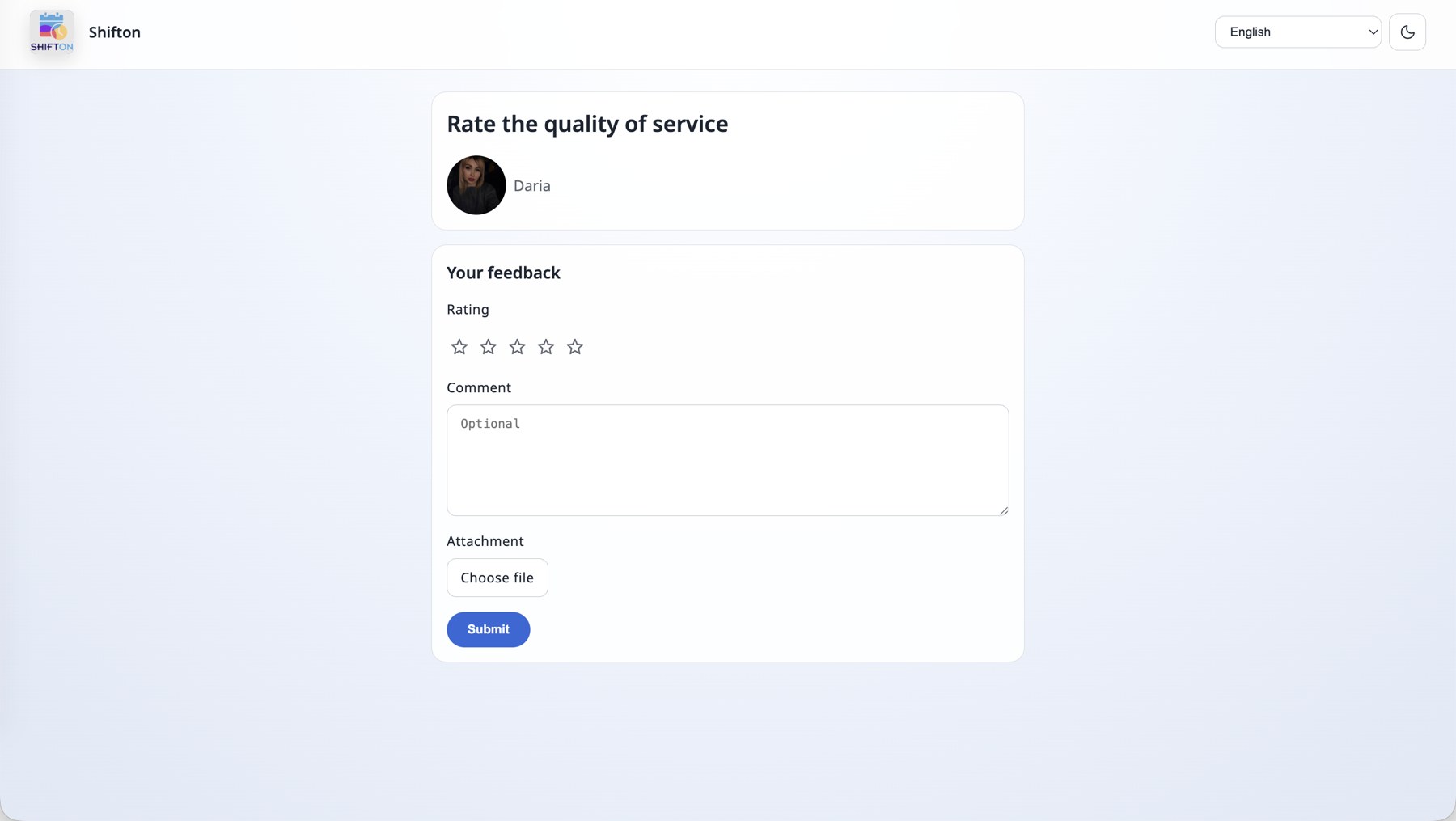
The link opens a rating form: the technician’s photo and name, a five-star rating, an optional comment and an attached file. The client does not need to register.
The reviews page
Filters
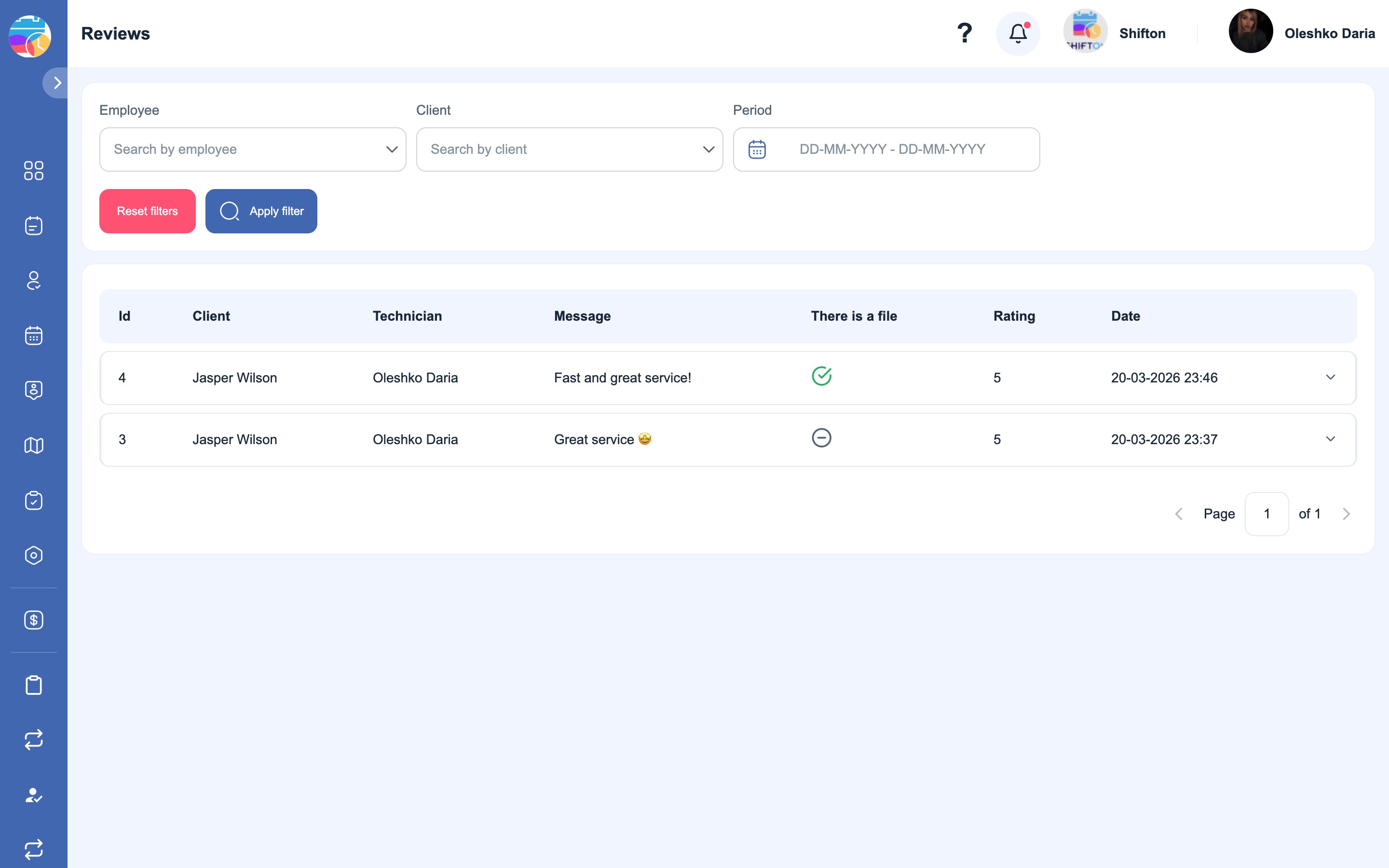
There are three filters above the table:
- Employee — search by the technician the review is about.
- Client — search by the client who left the review.
- Period — a date range.
Click “Apply filter” to filter the list, or “Reset filters” to bring back all reviews.
Table columns
| Column | What it shows |
|---|---|
| Id | The review number |
| Client | Who left the review |
| Technician | The technician the review is about |
| Message | The client’s comment |
| There is a file | Whether the client attached a file |
| Rating | A score from 1 to 5 |
| Date | When the review was submitted |
A row can be expanded to see the full review — a long comment is truncated in the table.
How to use this
- Assess the work of a specific technician — the Employee filter: it shows all their reviews and ratings for the period.
- Look into a complaint — the Client filter: this client’s entire review history in one place, together with the attached files.
- Reviews cannot be edited or deleted from the app. This is the client’s response, and it stays as it is.
Possible problems and solutions
| Problem | Reason | Solution |
|---|---|---|
| There are no reviews at all | The review link was not sent to clients | Check that the {link_feedback} placeholder is inserted into the text of the rule for the closing status |
| The client says the link did not open | The task had not been completed yet when the link was opened | The review link starts working after the task is moved to a final status |
| The client wants to correct a review or add a photo | The review has already been submitted and the link has become inactive | A review cannot be left again. An addition can be accepted through the task chat |
| There was a review, but it is not visible in the list | It does not fall within the selected period or it is filtered out | Click “Reset filters” and widen the Period |
| There is a mark in the There is a file column, but the file is not visible | The file is shown in the expanded row | Expand the review row |
FAQ
Question: How does a client leave a review? Answer: Through the link from an SMS or an email — it is inserted into the text using {link_feedback}. The client needs neither registration nor signing in.
Question: Why don’t clients receive a review request? Answer: Most likely the {link_feedback} placeholder is not inserted into the text of the rule. The link is not added to the message on its own.
Question: When is the best time to ask for a review? Answer: After the task is completed — before that the link does not work. It is usually inserted into the rule for the final status or into an “an hour after the visit” reminder.
Question: What scale is used for the score? Answer: From 1 to 5 stars.
Question: Is a comment mandatory? Answer: No, the client can leave a score only. The comment and the file are optional.
Question: Can clients attach a photo? Answer: Yes. Such reviews are marked in the There is a file column, and the file itself is visible in the expanded row.
Question: Can I view the reviews for a single technician? Answer: Yes, the Employee filter and the “Apply filter” button.
Question: Can a review be deleted or corrected? Answer: No. A review is the client’s response, and it is kept in its original form.
Question: Does the technician see the reviews about themselves? Answer: The reviews page is available to the company owner and administrator.
Question: Can a client leave several reviews for one task? Answer: No. A review is left only once: after it is submitted the link becomes inactive, and the form cannot be opened again.
Question: Is a notification sent about a new review? Answer: There is no separate notification — new reviews appear on this page.